프리티어로 인해 ec2가 만료되어 다시 서버셋팅을 하게 되었다. 그 과정을 정리하기 위한 게시글이다. React + Spring Boot + AWS RDS로 구성된 풀스택 서비스를 AWS EC2에 Docker 기반으로 배포하였다. 프론트엔드는 Nginx에서 정적 파일을 서빙하고, 백엔드 API는 Nginx Reverse Proxy를 통해 Spring Boot로 전달하는 구조로 구성하였다.
전체 아키텍처
구성은 다음과 같다.
Client (Browser) ↓ Nginx (Static + Reverse Proxy) ↓ Spring Boot API ↓ AWS RDS
$ ./deploy.sh
> Git Pull
Already up to date.
> 프로젝트 Build 시작
Starting a Gradle Daemon (subsequent builds will be faster)

FAILURE: Build failed with an exception.

* What went wrong:
Directory '/home/ubuntu/app/repository/MyApp' does not contain a Gradle build.

A Gradle build should contain a 'settings.gradle' or 'settings.gradle.kts' file in its root directory. It may also contain                                                     a 'build.gradle' or 'build.gradle.kts' file.

To create a new Gradle build in this directory run 'gradlew init'

For more information about the 'init' task, please refer to https://docs.gradle.org/8.5/userguide/build_init_plugin.html i                                                    n the Gradle documentation.

For more details on creating a Gradle build, please refer to https://docs.gradle.org/8.5/userguide/tutorial_using_tasks.ht                                                    ml in the Gradle documentation.

* Try:
> Run gradlew init to create a new Gradle build in this directory.
> Run with --stacktrace option to get the stack trace.
> Run with --info or --debug option to get more log output.
> Get more help at https://help.gradle.org.
천천히 읽어보니 setting.gradle이 없단다..
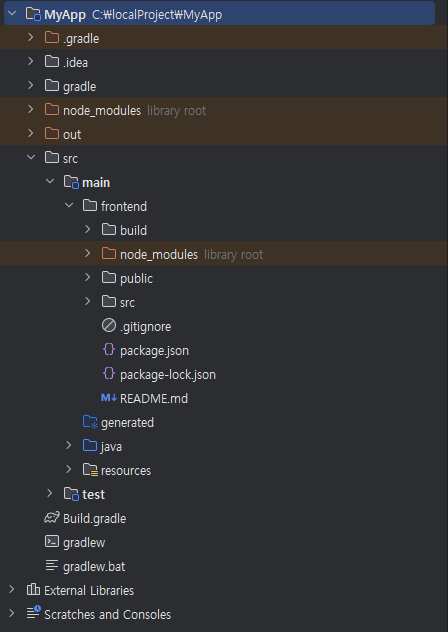
로컬에서 프로젝트 폴더에 확인해보니 정말 없다..어휴 결국 직접 파일을 만들어 git에 push 해주었다
$ ./deploy.sh
> Git Pull
Already up to date.
> 프로젝트 Build 시작
Starting a Gradle Daemon, 1 busy Daemon could not be reused, use --status for details

> Task :buildEnvironment

------------------------------------------------------------
Root project 'MyApp'
------------------------------------------------------------

classpath
No dependencies

A web-based, searchable dependency report is available by adding the --scan option.

BUILD SUCCESSFUL in 12s
1 actionable task: 1 executed
> step1 디렉토리로 이동
> Build 파일 복사
> 현재 구동 중인 애플리케이션 pid 확인
현재 구동 중인 애플리케이션 pid:
> 현재 구동 중인 애플리케이션이 없으므로 종료하지 않는다.
> 새 애플리케이션 배포
> JAR Name: MyApp-0.0.1-SNAPSHOT-plain.jar
npm error code ENOSPC
npm error syscall write
npm error errno -28
npm error nospc ENOSPC: no space left on device, write
npm error nospc There appears to be insufficient space on your system to finish.
npm error nospc Clear up some disk space and try again.
npm error A complete log of this run can be found in: /home/ubuntu/.npm/_logs/2024-08-05T13_08_44_437Z-debug-0.log
react root 폴더에서 npm start 명령어를 시도했더니 위와 같은 에러를 뱉는다..
쇼핑몰 프로젝트를 진행중인데 목록에 이미지가 노출되야하는데 계속 경로를 못찾아왔다 프로젝트 폴더 경로가 D:에 있으니 파일에 액세스를 못하더라 그래서 일단 프로젝트 경로부터 C:로 옮겼다 그런데 계속 빌드가 안되는 일이발생.. gradle로 빌드를 하려는데 build.gradle을 찾을수가 없으니 폴더를 생성하라는 메세지가 나와서 git에있던 파일을 가져오니 정상적으로 프로젝트가 동작했다 여기까진 그렇다치고..경로를 어디로 해야 React에서 찾을수 있나보니 public으로 보통 경로를 찾아간다 하더라 그래서 public 밑에 upload 폴더를 만들어서 업로드해보니 파일이 생성되었다 생성된 경로로 크롬 주소로 찍어보니 이미지가나오길래 해당 경로를 그대로 img 태그로 가져왔다